CUEVON is event planning software for event agencies and in-house teams. Plan the room, manage guests and seating, and prepare the event-day schedule in one workspace.
For corporate events, dinners, awards and roadshows.
Create an event, build the plan and prepare the handover. Select a stage to explore the workflow.
One event.Connected decisions.
01 / 06
Give the event a starting point.
Capture the brief, services and known details. Follow planning stages as decisions take shape; leave unknown dates or venue details visible.
What you carry forwardAn event brief the team can build on.
Unknown can stay unknown. A stage change does not silently approve the work.
Small details. Real planning work.
A closer look at what’s built in.
Move the tables. Reveal the seat labels. Follow a PDF into the floorplan.
01 / Room to move
The chairs count, too.
The closest chair can change the gap. CUEVON checks the table and its linked chairs together.
Interactive illustration · native CUEVON symbols
Below your chosen target
Try the slider or reveal the seat references. These example distances are not recommendations. Checks support planning; they do not certify safety, exits or capacity.
02 / Start with the venue
Start with your venue PDF.
Bring the venue drawing into the workspace, then turn it into a plan you can work with.
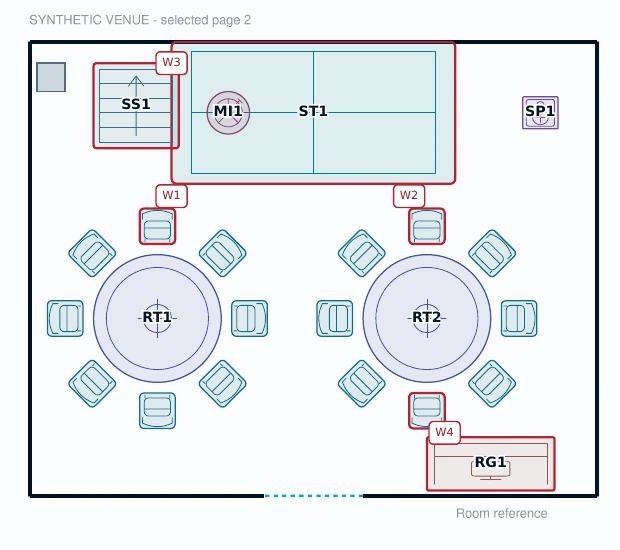
Illustrative PDF-to-layout workflow
Your venue PDF becomes the reference.
Select the page you need from a PDF, or import a JPG or PNG.
The PDF is a visual reference. Scale and room geometry are confirmed by the planner.
Guests & RSVP / online module in development
From invite to reply. From guest list to seat.
The RSVP module is being built around branded invitations, personal reply links and confirmation messages, with responses visible to the organiser inside the event workspace.
01
Design & invite
Prepare the event branding, review the recipient list and send a personal invitation.
02
Receive a reply
Guests use their personal link to choose attending or unable to attend, with confirmation messages in the flow.
03
Track the response
Give the organiser a clear view of replies and the guests who have not answered.
04
Plan the seating
Use each guest’s response to guide seating decisions and prepare the plan for handover.
Already in the guest register
A reply has its own status.
Import guests, record replies received by your team and assign seats. Keep the response separate from the seat assignment.
Attending
Tentative
Declined
Unanswered
Waiting list
Available now: guest lists, manual RSVP records, seating and invitation design previews. Online invitation sending, guest reply links and confirmation messages are in development and are not included in current access.
Sample event export with CUEVON branding. Fictional venue and equipment data. A planning example, not an approved venue plan.
One connected workspace
What you can plan with CUEVON.
Start with a named event, add the services you need and build the brief as details become clear. Follow the event from enquiry and concept through production, event day and closeout.
Unknown dates and venue details can stay unknown. Stage notes and review checkpoints record decisions; moving a stage does not silently complete tasks or approve a layout.
Import a PDF, JPG or PNG reference, calibrate a known distance, then draw venue geometry and place furniture, staging and equipment. Move, rotate, resize and duplicate items while keeping their dimensions independent of your screen zoom.
Keep alternative layout drafts, review equipment-spacing warnings and prepare a printable plan with its inventory. Spacing checks support planning; they do not certify exits, aisles, venue safety or occupancy.
Build your guest register before the floorplan is ready. Add people manually or through the Excel import preview, record replies received by your team, and allocate guests to seats in the selected layout.
Attending, tentative, declined, unanswered and waiting-list records remain distinct. A placed chair is a seat, a guest reply is a response, and neither is proof of arrival. The online RSVP module is being developed for invitation sending, personal reply links and confirmation messages.
Plan preparation jobs and the running order: the schedule for setup, soundcheck, doors opening and other event activities. Add an owner, timing and anything that must happen first.
When the event timing changes, review the proposed shifts before applying them. Fixed appointments keep their timing. Dependency and overlap checks help you spot the decisions that still need attention.
Prepare an event-specific design with a client logo, banner, colours, wording and help contact. Review invitation, reply-page and confirmation previews at wide or phone width.
Save the design with the event and review it at phone or desktop width. Sending invitations, collecting online replies and issuing confirmations are in development.
Prepare the selected floorplan, equipment inventory and running order for print or browser PDF export. Download the editable project when you need a portable copy and reopen it as a separate event.
The plan export follows the full layout, independently of editor zoom. The editable project copy retains the connected planning records. A document export and a confirmed event save are shown as separate actions.
What’s next / planned module
Ticket Distribution. With review built in.
Planned for events with existing ticket PDFs: bring recipients and tickets together, review who receives each file, approve sending and track progress.
In product planning and development. Availability, packaging and pricing are still to be confirmed.
Planned workflow
01
Import
Recipients + ticket PDFs
02
Match & validate
Flag missing, duplicate or uncertain assignments
03
Review & approve
A person confirms the distribution
04
Send & monitor
Sending progress, issues to review and downloadable reports
A Microsoft 365 sending option is planned. Uncertain ticket assignments will need a person to review them before sending.
The name behind the vision
The meaning behind CUEVON.
C
Concept
U
Unity
E
Execution
V
Vision
O
Ownership
N
Next
From the first concept to live execution, the ambition is to bring every moving part of an event into one workspace.
Why CUEVON
Built from the work behind the event.
By Krste Gelebeshov · Founder, GEVON
The room changes. The guest list grows. A delivery moves. The plan still needs to hold together.
When the brief, guest list and event schedule live in separate files and messages, every change takes another round of checking. CUEVON brings those planning records into one event workspace, so organisers can keep the room, people and schedule in view.
Plan the work behind the experience.
Start with the brief, arrange the floorplan and equipment, record guest replies and assign seats. Give preparation jobs an owner and build the running order for the day. GEVON built CUEVON around these practical event-operations tasks.
See what a change affects.
Review spacing as you arrange the room. When event timing changes, review proposed shifts while fixed appointments stay in place. Keep replies separate from seat assignments, so you can see what is confirmed and what still needs a decision.
Give the team a usable handover.
Export the floorplan with equipment quantities and spacing review, and prepare the running order as a separate printable document. Keep an editable project copy for later planning. The sample above shows what a floorplan handover contains.
See CUEVON with your event in mind.
Tell us about your next event and the planning tasks you want to explore. GEVON will review your request, help you understand how CUEVON fits your workflow, and confirm early-access availability and terms.